

19.9 C
New York
Tuesday, April 14, 2026

Stop WhatsApp from sharing your data with Facebook

WhatsApp announced recently that they will share your contacts and phone number with Facebook. Many users are concern about their private data and they do not want to share information with Facebook. There are two ways you can turn off data sharing with Facebook.

This first option comes before you accept WhatsApp’s newly updated terms and conditions. Do not agree and click on read more option. At the bottom of the terms and conditions screen is a small note that says “Read more about the key updates to our terms and privacy policy.” Tap this, then uncheck the checkbox. You are done.
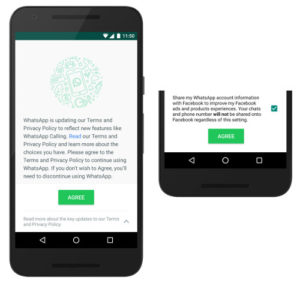
Stop WhatsApp from sharing your data with Facebook (1)

The second option applies if you already accepted the new terms and conditions. You have 30 days to change this option. Go to Settings> Account> Share my account info from inside the app. Uncheck at the bottom of this screen, now Whatsapp will not share your data with Facebook.
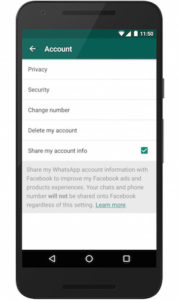
Stop WhatsApp from sharing your data with Facebook (2)

Related articles

Kompletter Kaizen-Leitfaden für den verfluchten Kraken-Boss

Der verfluchte Kraken wurde gerade von den Entwicklern des Spiels...

Guide complet du boss Kraken maudit de Kaizen

Le Cursed Kraken vient d'être ajouté à Kaizen par...

Arknights: Endfield Vorschau – Ein zufriedenstellendes Gacha-Spiel

Die Beliebtheit von Action-Adventure-Gacha-RPG-Spielen wächst in den letzten Jahren. Jedes Jahr...

Arknights: Endfield – Aperçu – Un système de gacha satisfaisant

La popularité des jeux gacha RPG d'action-aventure connaît une...

Problème de chat textuel avec Palia: comment le résoudre

Joueurs Palia rencontrent plusieurs défis pendant leur expérience multijoueur...