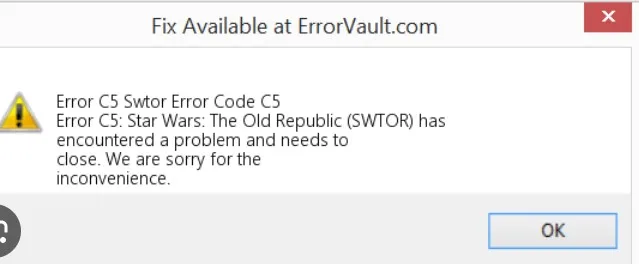
Embarking on a space-faring adventure in Star Wars: The Old Republic (SWTOR) can quickly turn into a cosmic nightmare if you encounter Error C5. Fear not, Jedi or Sith; this guide has you covered on all things SWTOR Error C5. From the underlying causes to step-by-step fixes, we’ve got the deep dive you need.
Key Takeaways
- Causes of SWTOR Error C5
- Troubleshooting Strategies
- SWTOR Error C5 Fixes for Different Operating Systems
- Common Mistakes to Avoid
What Really Causes SWTOR Error C5?
Before we jump into the nitty-gritty fixes, it’s crucial to understand the why. The game error occurs commonly during gameplay, but you can also encounter it during installation or even when launching the game. Here are some frequent culprits:
- Corrupted Game Files: Easily the leading cause, a few skewed ones and zeros can throw everything into disarray.
- Outdated Software: An aging game client or outdated drivers can sometimes prompt this error.
- Network Issues: Occasionally, unstable internet connections or problematic firewalls can throw this error your way.
- Operating System Compatibility: Whether you’re on Windows 10, 11, or a Mac, compatibility issues can surface as Error C5.
When and Where You May Face Error C5
During Gameplay
Running into SWTOR Error C5 during gameplay tends to ruin immersion. A likely cause could be outdated graphics drivers.
During Installation
Imagine the excitement of installing a new game and boom! SWTOR Error C5 during installation pops up. Corrupted game files often lead to this hiccup.
When Launching the Game
Nothing’s worse than gearing up for an exciting session only to encounter SWTOR Error C5 when launching the game. The culprit here often relates to server errors or bad game files.
Simple Troubleshooting Steps Before Diving Into Solutions
Before getting into detailed fixes, there are some simple SWTOR Error C5 troubleshooting steps you can take:
- Restart your computer: Often, a simple reboot clears temporary glitches.
- Update Game Client: Make sure you have the latest version installed.
- Check Internet Connection: A stable connection often eliminates server-related issues.
- Firewall/Security Software: Temporarily disable these to see if they’re causing the problem.
Fixes that Hit the Target: Step-by-Step Solutions
Fix 1: Update Graphics Drivers
- Go to Device Manager.
- Locate and right-click your graphics driver.
- Select “Update Driver” and follow the prompts.
Fix 2: Repair Game Files
- Open the game client.
- Navigate to ‘Settings’.
- Find the ‘Repair’ option and let the program do its magic.
Fix 3: Disable Firewall Temporarily
- Open Control Panel.
- Head to ‘System and Security’.
- Locate the Firewall settings and disable it momentarily. Re-enable once done.
Fix 4: Reinstall the Game
- Uninstall SWTOR.
- Download the latest version.
- Run the installer and follow on-screen instructions.
Fix 5: SWTOR Error C5 Workaround for Mac Users
- Ensure your Mac OS is compatible.
- Use a dedicated Windows emulator.
- Update SWTOR through the emulator.
Common Mistakes to Avoid
- Ignoring software updates.
- Neglecting to verify system requirements.
- Bypassing firewall settings without understanding potential consequences.
System Specific Fixes: September 23, 2023
SWTOR Error C5 on Windows 10 and 11
Compatibility modes work wonders. Navigate to the game file, right-click and choose ‘Run as Administrator’.
SWTOR Error C5 on Mac
Try using a Windows emulator like Parallels Desktop or Boot Camp.
SWTOR Error C5 on Steam and Origin
Always make sure your client is updated. A SWTOR Error C5 on Steam or Origin often relates to outdated clients.